
Vivid Seats | Event Tickets
Vivid SeatsEvents
4.79.85K Reviews
- Version
- 2026.145.0
- Installs
- 5.00M
- Age Rating
- Everyone
Screenshots
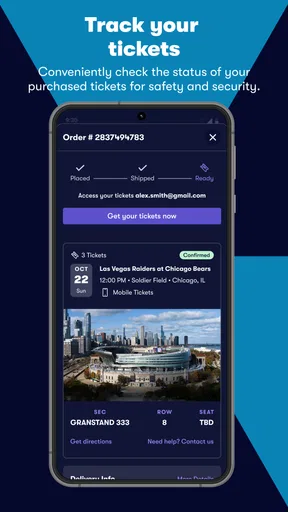
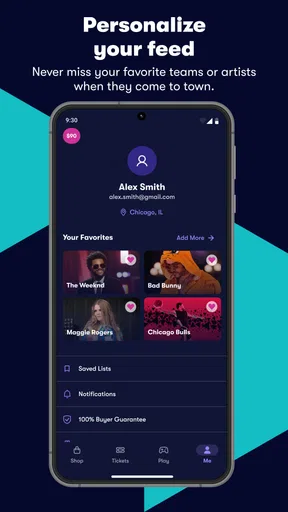
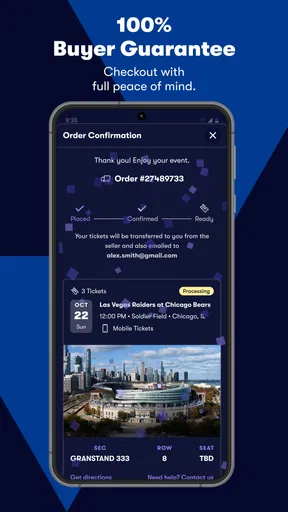
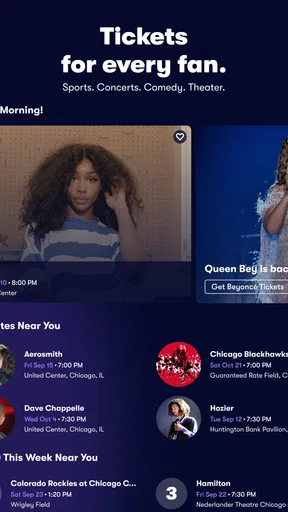
Our Review of Vivid Seats | Event Tickets
 Analysis by Appyee
When I’m deciding where to look for a concert, game, or show, I care about more than finding a listing: I want to understand what I’m buying and feel in control before I commit. Vivid Seats is an event-ticket app from Vivid Seats, and its broad mix of live entertainment makes it a useful place to begin that search. I’d treat it as a marketplace to compare options, not as a promise that every event or seat will be available.
A marketplace, not a shortcut around the details
The app is free, has an Everyone age rating, and has been available since May 28, 2015. Its current version is 2025.119.0, and it requires Android 8.0 or later. On the store, it has a 4.7 average from around 30,000 ratings, with more than 5 million installs. Those figures suggest that many people use it, but they don’t tell me whether a particular listing suits my plans. I still check the event, seating location, and checkout details before deciding.
That distinction matters because event tickets are a high-stakes purchase in a small way: the date is fixed, the seats affect the experience, and a mistake can be difficult to work around. I find the most sensible approach is to use Vivid Seats to explore what is available, then slow down at the decision point. A polished screen or a familiar event name is not a substitute for reading the details attached to the tickets I select.
Trust starts with choices I can inspect
I’m cautious about making broad claims about an app’s privacy or security without clear, verifiable information. In practical terms, I focus on what I can see while using it: what details are requested to set up an account, what choices appear during a purchase, and whether I can review an order before confirming it. I recommend taking those steps at your own pace rather than assuming that a quick checkout is automatically the best one.
For an event search, I’d begin with the least personal route available in the app and only provide account or payment information when I’m ready to proceed. Before submitting an order, I’d check the event date and venue, the selected seats, the total shown at checkout, and any terms presented there. That simple pause is useful in any ticket marketplace, especially if I’m comparing several options or buying while distracted.
Keep control of the purchase
There’s also a difference between browsing and committing. Looking through concerts, sports, and theater options can help me decide what kind of night I want; placing an order is a separate choice that deserves a careful review. If I’m buying for someone else, I’d confirm that the event and seating arrangement work for everyone before paying, rather than relying on a quick message exchange after the order is placed.
I would not assume that every event has identical delivery, entry, or resale conditions. Those can depend on the specific listing and the information shown during the transaction, so I’d read the details on the event I’m actually considering. If a policy or seat description is unclear, that’s a good reason to pause and seek clarification before buying rather than treating the general appeal of the app as an answer.
Using Vivid Seats for real plans
For someone who regularly checks live events, the app’s main appeal is having concerts, sports, and theater in one place. Vivid Seats has an average rating of 4.7 and more than 5 million installs, but I’d still judge it by whether it helps me find a suitable event and understand the choices in front of me. It is developed by Vivid Seats, and its focus on event tickets is clear from the first search.
Finding the right event without rushing
Browsing works best when I start with a specific anchor: an artist, team, type of show, or location. That gives me a manageable search instead of scrolling through events with no plan. If my date is flexible, I’d compare nearby options before settling on one; if the date is fixed, I’d check the event details first and then compare the seats that are actually available for it.
One useful habit is to separate “I want to go” from “this is the ticket I want.” An event can be appealing while a particular seat, price, or arrangement is not. I’d use the seating chart to orient myself, then look carefully at the seat information provided for the selected option. A chart helps me make a more informed choice, but I wouldn’t treat it as a guarantee of the view or overall experience beyond what the listing describes.
For a realistic weekday example, imagine I’m making plans after work and want to see a game with a friend. I can search for the team or event, compare the available seating, and share the relevant details with my friend before completing a purchase. That extra check can prevent a rushed decision about location or date. If we can’t agree on a suitable option, I’d rather keep looking or choose another event than buy simply because tickets are on screen.
Buying carefully and comparing alternatives
The app’s checkout is described in the original review as straightforward, but a smooth sequence of screens should not make me skip the final review. Before confirming, I’d make sure the event is correct, the seats match my selection, and the full amount and terms shown at checkout are acceptable. Payment methods and purchase conditions can matter to different people, so I’d rely on the choices displayed during my own transaction rather than assuming a particular method or condition will apply to every order.
Compared with searching through an event venue’s own ticket channel, a marketplace can be convenient when I want to browse different events or compare ticket options in one app. The trade-off is that I need to be especially attentive to the exact listing and its terms. A venue’s own channel may be a better first stop if I want to check its direct inventory or venue-specific information. For a high-demand event, I’d compare both routes instead of assuming one will always have the best availability.
Compared with general search results or a seller’s informal offer, an organized ticket app gives me a clearer place to inspect the event and seat selection before checkout. Still, a marketplace is not necessarily the best fit for someone who only wants official direct-sale inventory, dislikes creating accounts, or prefers to make every purchase through a venue. I’d also skip buying in a hurry if I can’t review the order carefully; convenience is useful only when it doesn’t crowd out a sensible decision.
Practical trade-offs for repeat event-goers
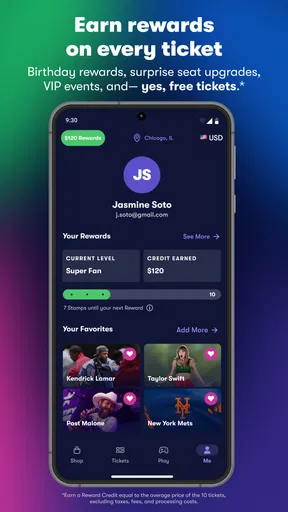
The original review notes a reward program in which ticket purchases earn credits that can be used toward future purchases, as well as deals that may appear in the app. I’d think of those as possible extras, not as a reason to buy a ticket I otherwise wouldn’t choose. A discount or credit only helps when the event, seat, and total still make sense for my plans. If I attend events occasionally, the program may be less important than finding the right ticket for this particular night.
For someone who goes out often, I’d keep a simple routine: search early enough to compare options, check the listing again before checkout, and save the order details somewhere easy to find afterward. That last step is useful when plans involve other people or when I’m arranging travel around an event. I would not rely on memory alone for the date or seating, especially if I’m managing more than one plan at once.
Another trade-off is availability. The original review found that selection could be broad but not complete, and that searching for high-demand events could sometimes feel slow. If a result takes time to load, I’d avoid repeatedly tapping purchase controls or making assumptions about whether an action went through. I’d let the screen settle, check the status presented in the app, and verify the order before trying again. For events with limited options, I’d also compare another ticket source rather than treating one search as the whole market.
Who will get the most from it
I think Vivid Seats is most useful for people who browse several kinds of live entertainment and want a single app for exploring ticket options. It can also suit someone who is willing to compare seating and read transaction details instead of buying on impulse. If I’m planning a night with friends, the app can help me narrow down an event and discuss specific seats before anyone commits.
It may be less useful for a person who already knows they only want tickets sold directly by a particular venue, or who wants a guaranteed result for a sold-out event. Search breadth does not mean every event will be listed, and a marketplace cannot make an unsuitable seat right for me. If the event is especially important, I’d check the venue’s own sales channel as well and compare the terms rather than relying on a single app.
I’d also advise first-time users not to let a countdown feeling or a crowded search screen push them into a purchase they haven’t checked. The practical questions are straightforward: Is this the right date and venue? Do these seats work for me? Is the amount shown acceptable? Have I read the conditions attached to this selection? If any answer is uncertain, pausing is better than hoping the details will be easy to change later.
A measured recommendation
Overall, I see Vivid Seats as a convenient starting point for shopping for live events, especially when I want to compare concerts, sports, and theater without jumping immediately between unrelated searches. The app’s layout and seating chart can make browsing feel more directed, while the marketplace nature of ticket buying means I still need to inspect each listing and checkout carefully. The experience is strongest when I know what I’m looking for and take a moment to verify the details.
My recommendation is cautious rather than automatic: use it to explore and compare, but make the final decision based on the actual event, seat, and terms shown for your order. It is free to download, and its broad audience is reflected in its 4.7 average across around 30,000 ratings, but those figures are context, not a guarantee that every search will be quick or every ticket will be right for you. If you value having many kinds of events together and are comfortable checking the fine print of a purchase, it’s worth considering. If direct venue inventory or a particular seller’s conditions matter most, compare those options before paying.
Getting Started with Vivid Seats
First off, downloading and setting up Vivid Seats is a breeze. Available for both Android and iOS, the app has a sleek design that’s super easy to navigate. Once you’ve got it on your device, you just need to create an account or sign in with your existing credentials. In no time, you’ll be diving into a world of events!
Browsing Events
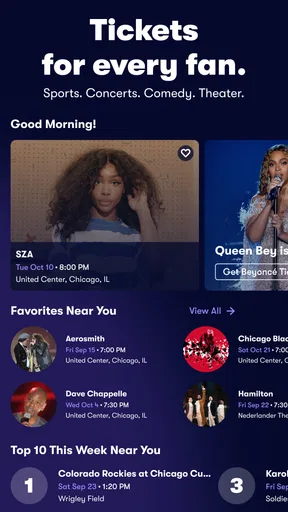
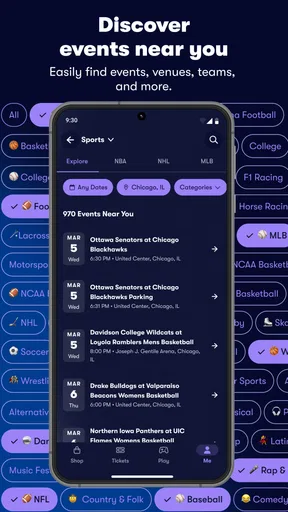
The app’s main screen showcases trending events, and you can search by category or location. Whether you’re a music lover, a sports fan, or a theater aficionado, there’s something for everyone. I was impressed by how well-organized the categories are. You can even set alerts for your favorite artists or teams, so you’ll never miss an announcement.
The Buying Experience
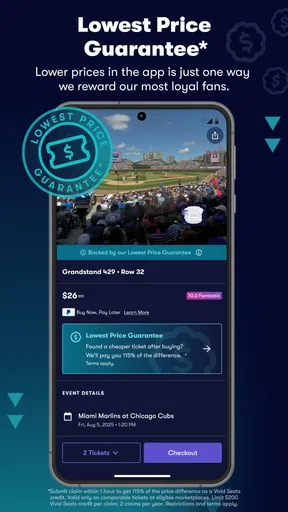
Now, let’s talk about the nitty-gritty—buying tickets. The app provides a detailed seating chart for each event, which I found incredibly helpful in choosing the perfect spot. Once you’ve picked your seats, the checkout process is straightforward. You can pay through various methods, including credit card and PayPal. What’s more, they offer a 100% Buyer Guarantee, so you can purchase with confidence.
Why Choose Vivid Seats?
One feature that stands out is the reward program. Every ticket purchase earns you reward credits, which can be used for discounts on future purchases. If you’re a frequent event-goer, this is a neat perk. Plus, the app often has exclusive deals and discounts, so keep an eye out!
Room for Improvement
While my experience was mostly positive, there’s always room for improvement. Occasionally, the app’s loading time was a bit slow, especially when searching for high-demand events. Also, while the selection is vast, it might not always have every event you’re looking for. But hey, no app is perfect, right?
Overall, Vivid Seats is a solid choice for anyone looking to simplify their ticket-buying experience. With its user-friendly interface, reliable customer service, and rewarding loyalty program, it’s definitely worth a try. So next time you’re planning a night out, why not give it a whirl? You might just snag the best seat in the house!
Privacy and Permissions
See what permissions an app requests and how it handles your data.
- Calendar
- read calendar events plus confidential information, add or modify calendar events and send email to guests without owners' knowledge
- Location
- approximate location (network-based), precise location (GPS and network-based)
- Phone
- read phone status and identity
- Photos/Media/Files
- read the contents of your USB storage, modify or delete the contents of your USB storage
- Storage
- read the contents of your USB storage, modify or delete the contents of your USB storage
- Camera
- take pictures and videos
- Wi-Fi connection information
- view Wi-Fi connections
- Device ID & call information
- read phone status and identity
- Other
- view network connections, full network access, control Near Field Communication, run at startup, draw over other apps, control vibration, prevent device from sleeping, modify system settings
Verdict
Strengths of Vivid Seats | Event Tickets
- User-friendly interface for easy ticket browsing.
- Wide selection of events and venues available.
- Secure payment options ensure safe transactions.
- Real-time updates on ticket availability.
- Offers personalized event recommendations.
Limitations of Vivid Seats | Event Tickets
- Service fees can be high compared to competitors.
- No option for ticket resale within the app.
- Limited customer support during peak times.
- Mobile app occasionally experiences slow loading.
- Some events have restricted seating information.
Similar Picks in This Category
View All
Easy Quran Mp3 Audio Offline
Muslim Worldapp4.7

Invitation Maker: Cards & RSVP
Greetings Island4.9

StubHub - Live Event Tickets
StubHub4.3

Fever: Events & Tickets
Fever Labs4.7

Epic Freebie Games Radar
Arioch Pds - Apps & Games4.4

Invitation card Maker, Design
Splendid App Maker4.9
Frequently Asked Questions
What is Vivid Seats, and how does it work?
Vivid Seats is a ticket marketplace that connects buyers with sellers for a variety of live events, including concerts, sports, and theater shows. Users can browse events, compare ticket prices, and purchase directly through the app. It offers a user-friendly interface and secure purchasing options to ensure a seamless ticket-buying experience.
Is Vivid Seats a reliable platform for purchasing tickets?
Yes, Vivid Seats is a reputable platform known for its reliability and customer service. It offers a 100% Buyer Guarantee, ensuring tickets are valid and delivered on time. The app provides a secure transaction process, and users can contact customer support for assistance with any issues or questions.
What fees are associated with purchasing tickets on Vivid Seats?
Vivid Seats charges a service fee that is added to the ticket price, which covers customer support and the platform's operational costs. The exact fee can vary depending on the event and the ticket price. Users will see the total cost, including all fees, before finalizing their purchase to ensure transparency.
Can I sell my tickets on Vivid Seats if I can’t attend an event?
Yes, Vivid Seats allows users to sell their tickets through the platform. To sell tickets, users need to create a seller account and list their tickets with details such as price and seat location. The app provides tools to manage sales and ensures secure transactions between buyers and sellers.
How does Vivid Seats handle cancellations or event changes?
If an event is canceled, Vivid Seats offers a full refund or a credit option, depending on user preference. For rescheduled events, tickets are typically valid for the new date, and users will receive updates regarding any changes. The app's customer service team is available to assist with questions about specific events.
